7 Best OCR Software in 2026: Top Tools Compared & Ranked
Table of Contents
- Compare the 7 Best OCR Software Solutions
- 1. Onymos: Best for AI-Powered OCR and Clinical Lab Automation
- 2. ABBYY FineReader PDF: Best for Enterprise OCR Accuracy
- 3. Amazon Textract: Best OCR API for Structured Data Extraction
- 4. Azure Document Intelligence: Best for Enterprise Document Automation at Scale
- 5. Google Cloud Vision: Best General-Purpose OCR API
- 6. Tesseract OCR: Best Open-Source OCR Engine
- 7. Mistral OCR: Best for Multimodal Document Understanding
- How to Choose the Best OCR Software
- Turn OCR Into End-to-End Document Automation With Onymos
Need a custom demo?
Use your own workflow and see where DocKnow can reduce manual work.
Get your demoKey Takeaways
- Onymos DocKnow is the best OCR solution for diagnostic and clinical labs that need to move beyond text extraction into full intake automation.
- ABBYY FineReader PDF is the most accurate standalone OCR tool for enterprises processing high volumes of mixed documents and scanned pages.
- Amazon Textract and Azure Document Intelligence are the strongest cloud-based OCR APIs for developers building structured data extraction into custom workflows and ETL pipelines.
- Tesseract OCR is the go-to open-source OCR engine for technical teams that need flexibility and don’t require out-of-the-box document understanding.
Most OCR software stops at text. It converts a scanned form into machine-readable text and hands it back to you. Whether the text is accurate, complete, or formatted correctly becomes your problem.
That’s fine if you’re digitizing an old book. It’s a serious problem if you’re processing test requisition forms where a mismatched patient name means a denied insurance claim 90 days later.
This guide covers the best OCR software in 2026 across use cases, including those built specifically for high-stakes workflows like laboratory intake and invoice processing.
Compare the 7 Best OCR Software Solutions
| Tool | Best For | Standout Feature | Starting Price |
|---|---|---|---|
| Onymos DocKnow | Clinical and diagnostic lab intake automation | SmartSync AI reconciliation + No-Data Architecture | Custom (contact sales) |
| ABBYY FineReader PDF | Enterprise OCR accuracy on complex documents | Best-in-class character recognition on scanned pages | From $16/month; monthly, annual, and 3-year plans available |
| Amazon Textract | Developer API for structured data extraction | Form elements, checkbox and radio button recognition, table extraction | Free tier available; page-based pricing with regional variations |
| Azure Document Intelligence | Enterprise document automation at scale | Pre-built models for invoices, receipts, and ID documents | Free tier available; page-based pricing with Pay-As-You-Go model and volume discounts |
| Google Cloud Vision | General-purpose OCR API with multi-language support | Google Vision OCR with broad language coverage and handwritten documents support | Unit-based pricing with first 1,000 units free; variable rates based on usage amount |
| Tesseract OCR | Open-source OCR engine for developer customization | Free, extensible, integrates into any ETL pipeline | Open-source and free |
| Mistral OCR | Multimodal document understanding with LLM context | Handles multimodal documents and complex layout preservation | $2 per 1,000 pages; 50% API-batch discount available |
If you’re running a diagnostic or clinical laboratory, most tools in this list are built for general document processing, not the specific workflows labs run every day.
Onymos is the only platform purpose-built for lab accessioning, test requisition form processing, and RCM enablement.
See how Onymos eliminates intake errors before they become revenue loss
Request a demo
1. Onymos: Best for AI-Powered OCR and Clinical Lab Automation
Onymos is not just another OCR tool. Its flagship platform, DocKnow, is an intelligent intake layer built specifically for clinical and diagnostic laboratories, combining optical character recognition with AI-driven data reconciliation, upfront eligibility checks, and full audit trail logging.
Where standard OCR software extracts text and stops, DocKnow extracts, cross-references, validates, and routes structured data directly into your existing LIMS, LIS, or RCM system.
The difference matters enormously when the documents in question are test requisition forms and the downstream consequence of bad data is a denied insurance claim.
Guardant Health, Personalis, and Vanta Diagnostics are among the organizations using Onymos to hyperscale their document operations.
Onymos Key Features
- SmartSync AI Data Reconciliation
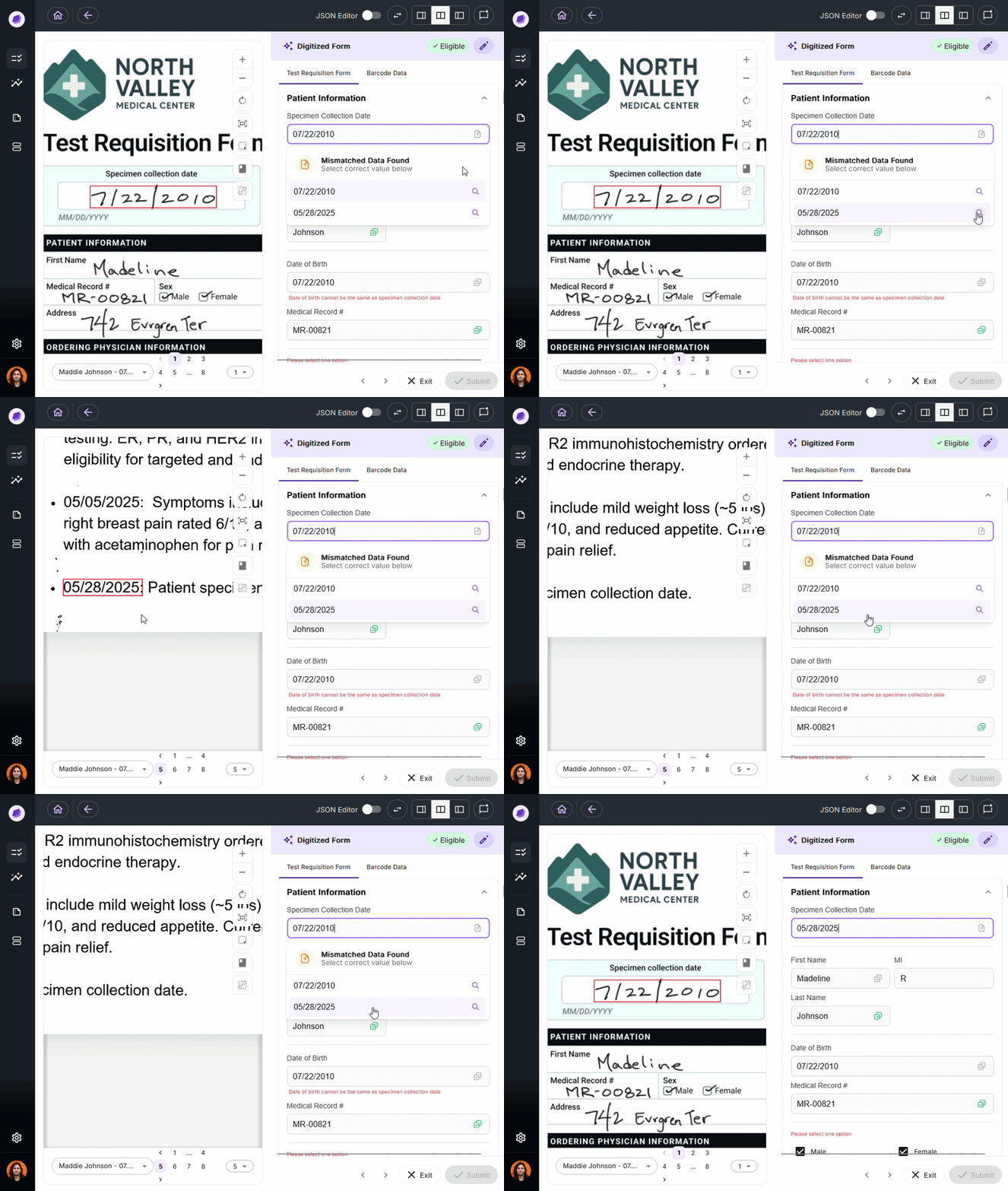
DocKnow’s proprietary reconciliation engine compares extracted values against connected systems and supporting documents in real time. For example, if a TRF lists a patient name as “Charlie” but the medical record says “Charles,” SmartSync flags it before the data moves downstream.
This is the mechanism that separates DocKnow from general-purpose OCR packages.
- Upfront Insurance Eligibility Checks
Most labs run eligibility checks after the test is complete, often because staff shortages make proactive verification impossible. DocKnow runs these checks automatically at the point of intake, before any work is done on the specimen.
When a check fails, the issue surfaces immediately, not after the lab has already absorbed the cost of running an uncovered test.
- No-Data Architecture
DocKnow is powered by Nucleus, Onymos’s underlying AI system, and operates on a No-Data Architecture, meaning Onymos never accesses, stores, or sees your patient data. All records remain inside your own infrastructure, whether on-prem or in your private cloud.
With over 55% of healthcare data breaches attributed to third-party vendors, this is a structural advantage, not a marketing claim.
Onymos won the Fortress Cybersecurity Award for this approach and is SOC 2 Type II and HIPAA compliant.
- Structured Data Extraction at Intake
DocKnow automatically extracts data from TRFs, insurance cards, patient medical records, and supporting clinical documentation. Every field is captured, validated against custom business rules built around each lab’s workflow, and cleaned before it reaches a LIMS or RCM system.
Manual data entry is eliminated, and downstream claim denials from incomplete documentation drop significantly.
Onymos Pricing
Onymos offers multiple pricing models, including per-page and volume-based. Packages can also be customized based on what platform functionality is activated.
Contact the sales team for a quote.
Where Onymos Shines
- Purpose-built for labs: Not adapted from a generic document management platform — designed from the ground up for lab accessioning, TRF processing, and reimbursement workflows
- Goes beyond OCR: SmartSync data reconciliation, upfront eligibility checks, and appeal letter generation are capabilities no standard OCR tool offers
- HIPAA-native security: No-Data Architecture eliminates the third-party data exposure risk that most SaaS tools expose their users to by default
Where Onymos Falls Short
- Lab-specific scope: Not designed for general hospital administration, legal document management, or non-healthcare use cases
- Custom implementation: Onboarding timelines and pricing depend on lab volume and workflow complexity, not a plug-and-play install
Onymos Customer Reviews
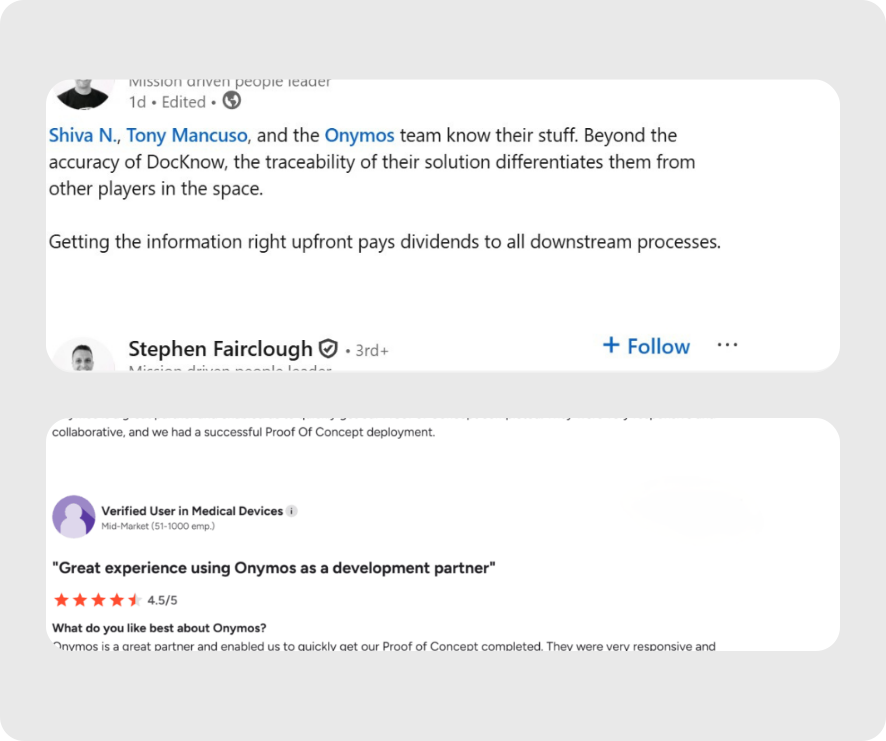
Stephen Fairclough, Personalis’s former VP of Informatics, praised two elements that he believes sets DocKnow apart from competing platforms: accuracy and traceability. Hanson wrote on LinkedIn, “Getting the information right upfront pays dividends to all downstream processes.”
An Onymos user praises, “Onymos is a great partner and enabled us to quickly get our Proof of Concept completed. They were very responsive and collaborative, and we had a successful Proof Of Concept deployment.”
Check out our customer success stories.
Who Onymos is Best For
- High-volume diagnostic labs processing hundreds or thousands of TRFs per week and losing revenue to intake errors and denied claims
- Labs with RCM challenges where billing failures trace back to missing or mismatched data at the point of intake
- Labs on growth trajectories scaling annually, that can’t manually manage the increased volume
Automate your documentation capture with Onymos
See DocKnow in action
2. ABBYY FineReader PDF: Best for Enterprise OCR Accuracy
ABBYY is widely considered the number one OCR platform globally, and for good reason. ABBYY FineReader PDF delivers best-in-class character recognition accuracy on scanned pages, handwritten documents, and complex multipage PDF files across more than 190 languages.
For enterprise teams that need to digitize large archives of physical documents, extract data from dense legal or financial paperwork, or produce searchable text files at scale, ABBYY remains the benchmark.
That said, ABBYY FineReader is a powerful general-purpose tool. It has no native support for clinical laboratory workflows, test requisition processing, or upfront eligibility checks. This makes it a strong pick for document digitization, but not a substitute for purpose-built lab automation software.
Key Features
- ABBYY FineReader PDF OCR engine: Industry-leading accuracy on degraded, low-resolution, or skewed scanned pages with strong layout preservation
- Multi-language support: Recognizes over 190 languages, including complex scripts and mixed-language documents
- Compare Documents: Detects textual changes between two document versions, useful for legal and compliance review
- Redaction and digital signing: Built-in redaction tool, dynamic stamps, and digital signing alongside OCR and PDF editing
Pricing
| Plan | Tenure | Price |
|---|---|---|
| FineReader PDF Standard | Yearly | $99/Year |
| FineReader PDF Standard | 3-Yearly | $267/3-years |
| FineReader PDF Standard | Monthly | $16/Month |
| FineReader PDF Corporate | Yearly | $165/Year |
| FineReader PDF Corporate | 3-Yearly | $446/3-years |
| FineReader PDF Corporate | Monthly | $24/Month |
| FineReader PDF for Mac® | Yearly | $69/Year |
| FineReader PDF for Mac® | 3-Yearly | $186/3-years |
| FineReader PDF for Mac® | Monthly | N/A |
All of the above plans provide 1 standalone license. ABBYY also offers a free trial for both Individual and Business plans.
Where ABBYY Shines
- Best raw OCR accuracy: Consistently outperforms competitors on recognition of degraded documents and complex layouts
- Mature enterprise feature set: Redaction code sets, dynamic stamps, and compare documents functionality built in
- Broad language coverage: Best option for organizations processing documents in multiple languages
Where ABBYY Falls Short
- No lab-specific capabilities: No eligibility checking, TRF processing, or LIMS integration
- Desktop/on-premise focus: Less suited for fully cloud-native or API-driven workflow automation pipelines
- Pricing at scale: Per-seat licensing adds up quickly for large teams
Customer Reviews
Philip has high praise, saying, “ABBYY FineReader PDF turned out to be an incredibly accurate OCR, combined with the recognition of over 190 languages, an excellent way to work directly in PDF, but at a much lower cost. All this, combined with the incredibly good and fast support makes the product excellent for the needs of anyone who works with PDF files.”
Paul warns of this drawback: “That it does not have very sophisticated image preprocessing, for example in the detection and elimination of signatures and seals, which in some cases makes pages saturated with them unrecognizable by ABBY FineReader.”
Who ABBYY is Best For
- Enterprise document management teams digitizing large archives of paper or scanned files, requiring high OCR accuracy
- Legal and compliance teams that need document comparison, redaction, and audit-ready workflows
3. Amazon Textract: Best OCR API for Structured Data Extraction
Amazon Textract is a cloud-based service designed to extract structured data (not just text) from scanned forms, tables, and documents. Form elements, checkbox and radio button recognition, and multi-column table extraction are native capabilities.
For development teams building ETL pipelines or workflow automation around documents like invoices, insurance forms, or onboarding paperwork, Textract’s Optical Character Recognition API is one of the most capable options available.
Key Features
- Structured data extraction: Extracts tables, form fields, and key-value pairs, not just raw text
- Checkbox and radio button recognition: Detects form elements including fillable forms and scanned forms
- Queries API: Ask specific questions of a document and receive targeted structured answers
Pricing
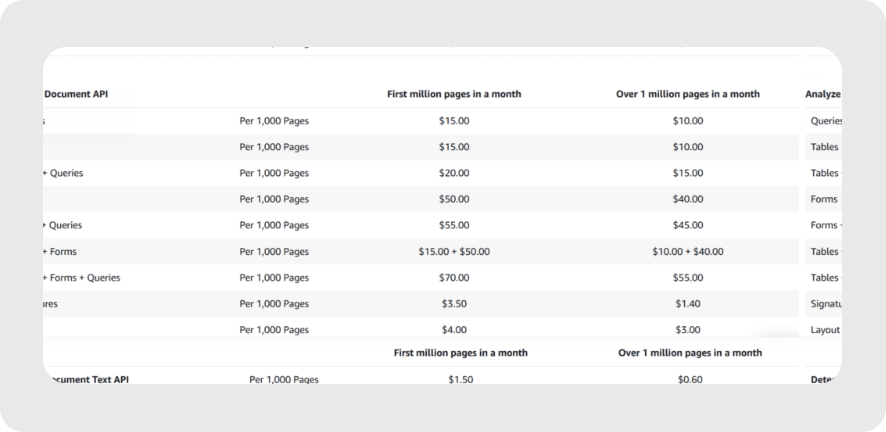
AWS offers a Free Tier where you can get started with Amazon Textract for free. This lasts for three months, with limits on the five different APIs offered.
Beyond this, AWS offers tiered pricing dependent on the region, as illustrated below for US East (Ohio):
Where Amazon Textract Shines
- Best structured extraction from forms: Superior to basic OCR for extracting fields from standardized documents
- AWS ecosystem integration: Native connection to S3, Lambda, and other services for cloud-native pipelines
- Scale: Handles high document volumes reliably as a managed cloud-based service
Where Amazon Textract Falls Short
- No validation or reconciliation: Extracts data but doesn’t check it for accuracy or cross-reference against other systems
- AWS lock-in: Deep integration with AWS makes migration to other platforms complex
- Requires developer resources: Not a no-code tool, so implementation requires engineering effort
For organizations that rely on broader enterprise integration layers, iPaaS platforms such as MuleSoft competitors like Workato, Boomi, or similar middleware solutions are often evaluated alongside API-first architectures like this.
Customer Reviews
Arup M. mentions, “It eliminates the need for manual data entry or complex OCR setups, making it simple to integrate into workflows. It processes large volumes of documents quickly, which is ideal for businesses with high data processing demands.”
Mustafa Asif Ali T. adds, “If you are a big fan of Amazon Web services you can get Textract in it. Though the accuracy is bit low when it comes to handwritten documents as handwriting vary from person to person. So might have to do some manual work there.”
Who Amazon Textract is Best For
- Development teams building document automation pipelines within the AWS ecosystem
- Invoice processing and onboarding workflows with high-volume, form-heavy document automation at scale
4. Azure Document Intelligence: Best for Enterprise Document Automation at Scale
Azure Document Intelligence (formerly Azure Form Recognizer) is Microsoft’s cloud-based document understanding platform. It includes prebuilt models for invoices, receipts, identity documents, and contracts, as well as a custom model builder for organization-specific document types.
For enterprises already embedded in the Microsoft 365 Copilot and Azure ecosystem, it integrates cleanly with existing infrastructure and supports digital transformation initiatives without requiring major platform changes.
Key Features
- Pre-built document models: Ready-to-use extraction models for invoices, receipts, ID documents, tax forms, and more
- Custom model builder: Train models on organization-specific document layouts using labeled samples
- Azure OCR engine: Microsoft’s underlying OCR engine with strong multi-language support and layout preservation on complex documents
Pricing
Azure Document Intelligence offers a flexible, consumption-based pricing model tailored to the complexity of the required data extraction. The costs are primarily driven by the number of pages processed.
There are three models offered.
1. The “Pay-As-You-Go” Model
Pricing is determined by the specific feature or “model” you use to process a document, such as the following:
| Feature Type | Description | Price (per 1,000 pages) |
|---|---|---|
| Read | Basic text and OCR (Optical Character Recognition) | $1.50 (drops to $0.60 after 1M pages) |
| Prebuilt Models | Specific forms (Invoices, Receipts, IDs, Tax forms) | $10.00 |
| Layout | Tables, selection marks, and structured text | $10.00 |
| Custom Extraction | Training a model for your unique business forms | $30.00 |
Note: There is a Free Tier available that allows you to process up to 500 pages per month at no cost, which is ideal for development and testing.
2. Commitment Tiers (Volume Discounts)
For enterprises with high-volume workloads, Azure offers “Commitment Tiers.” Instead of paying per page at the standard rate, you commit to a fixed monthly capacity for a discounted upfront fee.
If you exceed your committed volume, you are charged an overage fee of $0.01 per 1,000 pages, though this rate is usually still lower than the standard price.
Where Azure Document Intelligence Shines
- Pre-built model library: Fastest path to invoice processing and structured extraction without custom development
- Microsoft 365 integration: Natural fit for organizations already running Microsoft 365 Copilot and Azure cloud storage
- Scalable pricing: Free tier with generous pay-as-you-go scaling
Where Azure Document Intelligence Falls Short
- No cross-system validation: Like Textract, it extracts but doesn’t validate data against connected systems
- Azure dependency: Best value is inside the Azure ecosystem; benefits diminish outside it
- Complex custom model training: Labeled training data requirements can create bottlenecks for unusual document types
Customer Reviews
Saumyaranjan M. notes it provides, “Better OCR accuracy, hierarchical document structure, and support for generating searchable PDFs.”
Rakshit A. mentions, “The downsides of Azure AI Document Intelligence system is it supports only few languages, it does not support local languages. The pricing is very high so small startups and freelancers can’t afford it. Training the custom models with the customers data takes a lot of time for preparing the data, training it and then testing and for such task it requires an expert who has a good hands on machine learning and deep learning.”
Who Azure Document Intelligence is Best For
- Enterprise teams on Microsoft Azure: Embedding document automation into existing Azure and Microsoft 365 workflows
- Finance and operations teams: Processing invoices, receipts, and procurement documents at volume
5. Google Cloud Vision: Best General-Purpose OCR API
Google Cloud Vision (Google Vision OCR) is one of the most widely used cloud-based OCR APIs globally, offering strong general-purpose character recognition across more than 50 languages.
It handles handwritten documents, printed text, and image-embedded text reliably, making it a versatile option for teams that need a capable OCR engine without significant setup complexity.
Key Features
- Google Vision OCR: Reliable text extraction from images, PDF files, and scanned pages with broad format support
- Handwriting recognition: Handles handwritten documents with reasonable accuracy for general use cases
- Multi-language support: Covers 50+ languages with consistent results across scripts and character sets
Pricing
Unlike Azure’s page-centric focus, Google uses a “Unit” system, where a unit is typically a single image or a single page of a PDF. The first 1,000 units are provided for free.
Prices vary depending on the specific use case.
| Use case | Products used | Estimated monthly cost |
|---|---|---|
| Image tagging, processing, and search |
Cloud Vision Cloud Storage Pub/Sub Cloud Run |
$27.36 |
| Extract text and insights from documents |
Document AI Cloud Storage BigQuery Cloud Functions |
$71.87 |
| Extract text from images |
Cloud Vision Cloud Storage Pub/Sub Cloud Run |
$27.36 |
Where Google Cloud Vision Shines
- Easy API access: Simple integration for developers building OCR into applications
- Google ecosystem fit: Native integration with Google Drive and Google Docs
- Competitive pricing: Free tier covers light usage; pay-as-you-go scales predictably
Where Google Cloud Vision Falls Short
- General purpose only: No document-type-specific models for invoices, TRFs, or lab forms
- Limited structured extraction: Better at raw text than at understanding document structure or extracting form fields
Customer Reviews
A verified user mentions, “I have worked with multiple OCR engines, including other professional OCR engines available and I would definitely recommend using cloud vision if you are just starting out.”
Sachin P. notes, “I have faced problems in setting up this custom/user-defined model; the lack of sample documentation for the same. I feel the price for OCR is a bit higher.”
Who Google Cloud Vision is Best For
- Product developers: Embedding OCR capabilities into consumer or enterprise applications
- Small-to-mid teams on Google Workspace: Light document processing within the Google ecosystem
6. Tesseract OCR: Best Open-Source OCR Engine
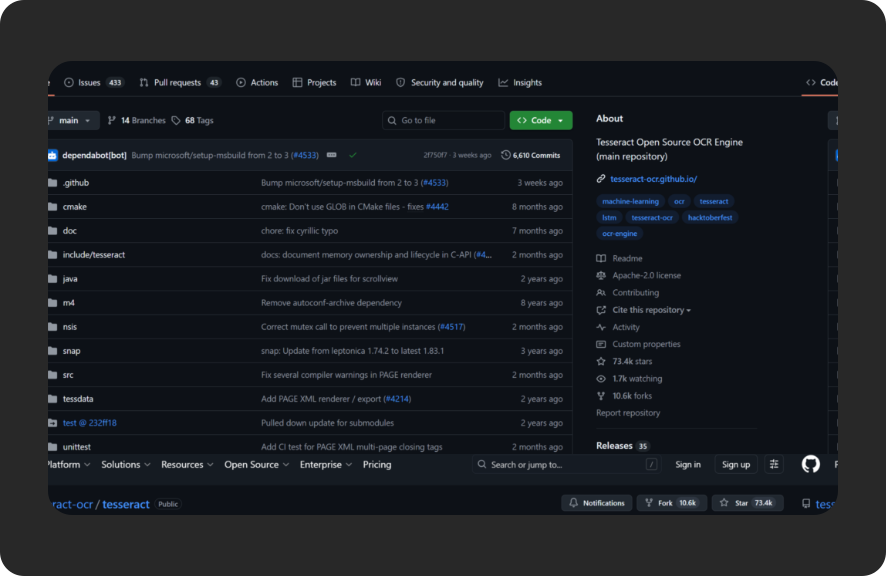
Tesseract OCR is the most widely used open-source OCR engine in the world, originally developed by HP. It supports more than 100 languages, integrates into virtually any software stack as a Java OCR Library or through Python and other languages, and is free under the Apache 2.0 license.
The caveat: Tesseract requires image preprocessing to perform well on low-quality scans, and its out-of-the-box accuracy on complex or degraded documents lags behind that of commercial tools like ABBYY. Teams typically pair it with preprocessing libraries and post-processing error correction layers.
Key Features
- Free OCR engine: No licensing costs; integrates into any ETL pipeline or workflow automation system
- 100+ language support: Covers Latin, Cyrillic, Arabic, CJK scripts, and more
- Extensible image library: Works as a standalone CLI or as an embedded image processing library in software packages across multiple languages
Pricing
Tesseract OCR is free and open source under the Apache 2.0 license.
Where Tesseract Shines
- Zero cost: The only meaningful option for teams with no OCR budget
- Flexibility: Can be embedded and customized to any workflow
- Community and documentation: Large developer community with extensive support
Where Tesseract Falls Short
- Accuracy on complex documents: Requires significant image pre-processing tuning to match commercial accuracy
- No managed service: No cloud-based service or SLA; you own the infrastructure
- Not compliance-ready out of the box: Requires additional layers for HIPAA-sensitive workflows
Customer Reviews
Amar K. mentions, “Tesseract is a great library for OCR, though there are different online and paid OCR libraries that do exist, that comes with a hefty cost, which is not affordable by the mid-scale organizations. The alternate is to look for a library that can work locally and is cost-efficient. Tesseracts serves both the purpose. it’s cost efficient and most accurate.”
Surbhi G. warns, “The accuracy of the pre-trained models is less accurate than many other commercially available OCR models. If the images quality and text varies a lot, especially with lot of numerics and fractions, it becomes difficult to get a good accuracy. Second thing I disliked is there are so many parameters that can be adjusted, but use of all the parameters is not very clear.”
Who Tesseract is Best For
- Developer teams: Building custom document pipelines with full control over the OCR stack
- Budget-constrained projects: Where licensing costs are a hard constraint
7. Mistral OCR: Best for Multimodal Document Understanding
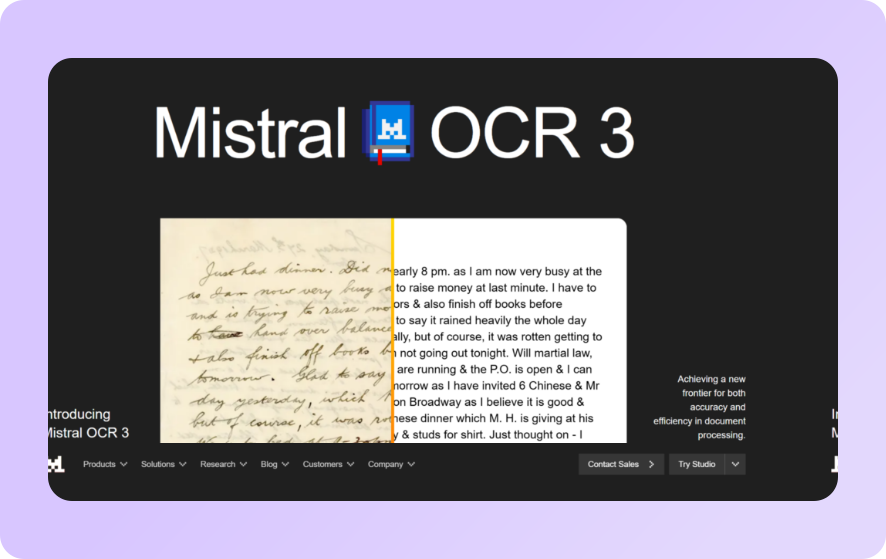
Mistral OCR (available via Le Chat and the Mistral API) represents a newer category of document processing that fuses optical character recognition with Large Language Models.
Rather than simply extracting text, it applies language model context to understand document structure, infer intent, and handle multimodal documents that combine text, tables, charts, and embedded images.
Key Features
- Multimodal document processing: Handles documents combining text, images, tables, and complex layouts in a single pass
- LLM-powered context: Large Language Models provide document understanding beyond raw character recognition
- Information abstraction: Extracts meaning and relationships from documents, not just text
Pricing
Mistral offers competitive pricing for its OCR function of $2 per 1,000 pages, with a 50% Batch-API discount, reducing the cost to $1 per 1,000 pages.
Where Mistral OCR Shines
- Complex layout preservation: Better than standard OCR at preserving document structure across mixed-format files
- Generative AI integration: Useful for teams building generative AI document workflows
Where Mistral OCR Falls Short
- Not a platform: Mistral’s OCR is an API, not a platform, that requires developers to turn it into a usable solution at enterprise scale
- Highly technical: Requires significant engineering effort to integrate, validate outputs, and operationalize
Customer Reviews
Reviews for Mistral are scarce, but early tests indicate it performs impressively at smaller scales but warn of issues with text misclassification, empty image output, and some formatting errors.
Who Mistral OCR is Best For
- AI product teams: Building document understanding features into AI-native applications
How to Choose the Best OCR Software
Not all OCR tools solve the same problem. Before choosing, clarify what your workflow actually requires. The gap between “extracting text” and “automating a document workflow” is where most tools fall short.
Accuracy on Your Specific Document Types
Raw OCR accuracy varies significantly based on document quality, layout complexity, and whether documents include handwriting, checkboxes, or tables.
For clean, digital documents, most tools perform comparably. For degraded scans, skewed pages, or handwritten documents, ABBYY FineReader PDF maintains the strongest accuracy track record among commercial tools.
If your documents are test requisition forms with inconsistent formatting across dozens of referring clinics, you need a tool with domain-specific intelligence, not just one that recognizes characters.
That’s where purpose-built platforms like Onymos DocKnow shine, separate from general OCR tools.
Structured Data Extraction vs. Plain Text Output
There’s a meaningful difference between OCR that produces text files and OCR that extracts structured data. If you need form fields, table values, and key-value pairs routed into a database or downstream system, you need structured data extraction.
Amazon Textract and Azure Document Intelligence are the strongest options at this layer for general use. For laboratory intake specifically, DocKnow adds cross-system validation on top of extraction, so the structured data that reaches your LIMS or billing platform is already verified, not just captured.
Security, Compliance, and Data Residency
Healthcare and financial workflows are subject to strict data handling requirements. HIPAA compliance is the baseline, but it’s not the whole picture. The critical question is: where does your data actually live?
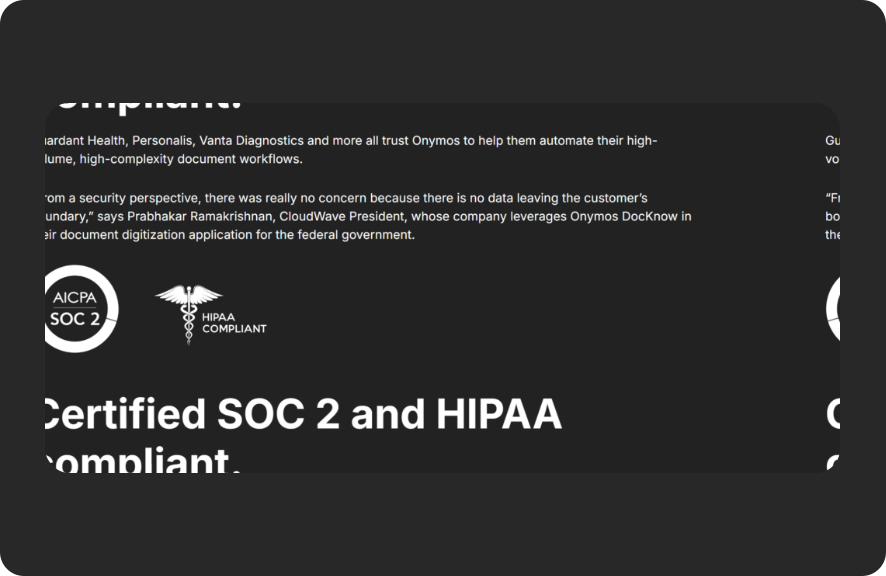
Most cloud-based OCR services process documents on vendor servers. That creates third-party data exposure risk. Onymos’s No-Data Architecture eliminates this risk by design: the platform never touches your data. Everything stays in your own environment.
For regulated workflows, this is not a minor detail. Review our HIPAA-compliant automation checklist before committing to any document processing vendor.
Integration With Your Existing Systems
The best OCR tool is the one that fits your existing stack cleanly.
- For AWS-native teams, Textract.
- For Azure shops, Document Intelligence.
- For labs running LIMS or LIS platforms, you need a tool that outputs clean, structured data directly into those systems via API.
Onymos DocKnow integrates via API with existing LIMS, LIS, and billing platforms with no rip-and-replace required. Labs keep the tools they already have. DocKnow makes them work better.
Build vs. Buy
If you have deep engineering resources, an Optical Character Recognition API such as Google Cloud Vision, Textract, or Azure Document Intelligence offers maximum flexibility. You build the logic, the API provides the OCR. This is a key decision point in the OCR vs IDP evaluation, where teams must decide whether they only need extraction APIs or a full intelligent document processing layer.
If you’re a lab operations or RCM team that needs a working solution without a development team, or whose development team cannot dedicate months or years to building a custom platform in-house, a managed platform is the right choice.
For lab-specific workflows, that means Onymos.
Explore how healthcare teams evaluate build or buy decisions for document processing
Turn OCR Into End-to-End Document Automation With Onymos
Most OCR tools solve the easy part: converting a scanned document into machine-readable text. The hard part is making sure the text is accurate, complete, and correctly structured before it drives a financial or clinical decision.
This is where most tools stop, and the real problem begins.
For diagnostic and clinical labs, the cost of getting this wrong isn’t an inconvenience. It’s denied claims, expired filing deadlines, compliance failures, and revenue that never comes back.
That’s what DocKnow is built for. If your team is still chasing down missing insurance details after a claim is denied, or manually keying data from paper TRFs into a LIMS, the fix starts at intake.
If you want to go deeper on the workflow side, start with lab workflow automation for labs that still use paper or browse Onymos customer stories to see how high-volume labs have made the transition.
Request a demo to see how DocKnow works.


Connect with our team to explore how Onymos solutions can maximize efficiency, minimize costs, and drive real, scalable growth.
Schedule your demoWe know healthcare data
AI in the lab. Workflow automation at scale. Digital front doors for hospitals and clinics. Healthcare and life sciences are changing fast. Are you ready? Subscribe to our blog for:
- Trends in healthcare tech
- Research and analysis
- Customer stories and more
>