IDP vs OCR: What’s the Difference & Which Should You Use?
Table of Contents
Need a custom demo?
Use your own workflow and see where DocKnow can reduce manual work.
Get your demoKey Takeaways
- Optical Character Recognition (OCR) converts documents and document images into machine-readable text and is best for simple document digitization tasks like creating searchable PDFs or searchable archives from static forms and structured templates
- Intelligent Document Processing (IDP) goes further, combining OCR with AI/ML technology to extract, classify, validate, and route structured data from unstructured and semi-structured data sources like medical records and supplier invoices
- For document-heavy processes involving high volumes, IDP delivers far superior data quality and workflow automation because it understands context, not just characters
- Onymos DocKnow is a purpose-built IDP platform for clinical and diagnostic laboratories, combining intelligent document processing with AI data reconciliation and No-Data Architecture
Imagine a complex workflow filled with scanned documents and handwritten forms, where manual data entry leads to errors and bottlenecks the entire process.
Knowing the difference between Optical Character Recognition (OCR) and Intelligent Document Processing (IDP) can help you equip the right tool to avoid these challenges.
OCR has been around for decades. It turns document images into machine-readable characters. That’s useful. But in complex document workflows, like laboratory accessioning, invoice processing, or insurance claims, text extraction alone isn’t enough. You need structured data, validated against business rules, and routed automatically into the right systems.
That’s where IDP comes in.
Keep reading to find out exactly how OCR and IDP differ, where each fits, and how to choose based on your actual workflows.
| OCR | IDP | |
|---|---|---|
| Best For | Simple document digitization; creating searchable text from scanned documents | Complex document workflows requiring structured data extraction, validation, and routing |
| Standout Feature | Fast, affordable text extraction from structured templates | AI-powered field extraction, entity recognition, and workflow automation |
| Price | Low to moderate; many free or low-cost OCR tools available (e.g., Adobe Acrobat, Google Vision, Azure OCR, ABBYY FineReader) | Custom or subscription pricing; typically enterprise-grade |
| Pros | Easy to deploy, fast, and works well on clean structured templates | Handles unstructured data, semi-structured data, and handwritten forms; higher data quality |
| Cons | No context awareness; breaks on unstructured or handwritten input; requires manual review | More complex to implement; higher upfront investment |
| Ease of Use | Faster to deploy with a plug-and-play workflow | Largely automated functions with a trickier initial implementation phase |
| Customer Support | Often limited support; primarily self-serve documentation | Dedicated teams for implementation and ongoing customer service |
| Integrations | Limited integration depth | Wider scope of integrations |
| Data Accuracy | Character-level accuracy with no dedicated error prevention features | Error prevention is a core function; validation and reconciliation functions available |
Who is IDP Best For?
IDP delivers the most value in environments where document volume is high, document formats are inconsistent, and data errors carry real financial or compliance consequences.
IDP is the right choice for:
- Clinical and diagnostic laboratories processing test requisition forms, insurance cards, and medical records at scale
- Revenue Cycle Management (RCM) teams dealing with insurance claims, EOBs, remittance advice, and denial letters
- Financial Services organizations handling bank statements, expense receipts, and supplier invoices with variable formats
- Healthcare organizations that need eligibility checks run automatically before services are rendered
- Transportation & Logistics and commodities companies routing structured data from bills of lading or delivery documentation
- Customer onboarding teams in regulated industries, where onboarding documents must be validated against compliance requirements
- Legal personnel extracting specific clauses or obligations from legal documents across varying templates
If your team is manually reviewing OCR output before it enters your systems, IDP is almost certainly the right upgrade.
See how unstructured data analytics tools handle complex documents.
Who is OCR Best For?
OCR still has a clear, legitimate role, especially where document processing needs are straightforward, and volume is manageable.
OCR makes sense for:
- Small businesses digitizing paper records into searchable archives for internal use
- Legal work creating searchable PDFs from historical case files that don’t require field-level extraction
- Organizations building document management systems where storage and retrieval is the priority ( and not data extraction)
- Customer service teams that need to search scanned documents quickly but aren’t routing extracted data downstream
- Accounts payable teams handling low volumes of highly standardized invoices with fixed formats
- Any team using Google Drive or Microsoft Office to simply make documents keyword-searchable
Price
Cost is a real consideration but the more important question is what errors cost you. After all, a denied claim on a $2,000 genetic test that required manual appeals costs far more than the difference between an OCR license and an IDP platform.
IDP
IDP platforms are typically enterprise-grade, with custom pricing based on document volume, modules, and deployment model. Key considerations include:
- Volume-based pricing: Most platforms charge per document or per page processed
- Modular structure: Platforms like Onymos DocKnow are modular, meaning labs can adopt intake automation, billing support, or client services independently
- Implementation cost: Factor in setup, integration, and training time (this varies significantly between purpose-built and general platforms)
OCR
OCR is generally more accessible cost-wise:
- Free tiers available: Google Vision, Azure OCR, and others offer free usage tiers for low volumes
- Low-cost standalone tools: ABBYY FineReader, Adobe Acrobat, and similar OCR software start at modest monthly or annual fees
- Open source options: Tesseract and similar engines are free but require technical setup and lack enterprise support
Verdict
For simple digitization use cases, OCR wins on cost.
For high-volume, high-stakes document processing where errors have financial or compliance consequences, IDP’s ROI is typically clear within months, especially when you factor in the staff hours saved on manual data entry and appeals.
Ease of Use
Your document processing tool is only as good as the team’s ability to use it effectively. A powerful platform that requires a dedicated Solutions Engineer to operate isn’t practical for most lab teams.
IDP
Modern IDP platforms have significantly improved usability:
- Configurable workflows: Most platforms allow teams to define business rules and extraction logic without code
- Exception-handling interfaces: Staff can review flagged documents in a clean UI rather than raw data
- Lab-tailored UI: Purpose-built platforms like Onymos DocKnow are designed for lab technicians and billing teams, not IT departments
The initial implementation requires more setup than OCR, as integrations with LIMS, EHR, and billing platforms need to be configured. But once live, the day-to-day experience is largely automated.
OCR
OCR tools are generally faster to deploy:
- Plug-and-play tools: Adobe Acrobat, Google Drive integrations, and similar tools require minimal setup
- Familiar interfaces: Most users can extract text from a PDF without training
- Limited configurability: Simple is also limiting; there’s little you can tune when the output is wrong
Verdict
OCR wins on initial deployment simplicity. IDP wins on long-term operational ease. Once configured, it handles what would otherwise require constant manual effort.
Customer Support
When document processing breaks down, for example, if a form type changes, an integration fails, or a new payer requirement appears, support quality determines how quickly you recover.
IDP
Enterprise IDP vendors typically offer:
- Dedicated implementation support and onboarding teams
- Ongoing customer success management for configuration changes
- Compliance update support, particularly relevant for labs navigating CAP, CLIA, or HIPAA changes
OCR
Support for OCR tools varies widely:
- Self-serve tools like Adobe Acrobat or Google Vision offer documentation but limited direct support
- Enterprise OCR vendors like ABBYY offer more robust support tiers, including the ABBYY Marketplace for pre-built Document Skills
- Open-source tools like Tesseract have community support but no SLA
Verdict
For mission-critical document workflows, IDP’s dedicated support model is meaningfully better. OCR tools are largely self-service by design.
Integrations
Document processing doesn’t happen in a vacuum. The value is in what happens after extraction, such as data routing into billing platforms, LIS systems, LIMS, CRM systems, and BI & Analytics tools.
IDP
Modern IDP platforms are built for integration:
- REST APIs for direct data routing to downstream systems
- Native connectors to EHRs, LIMS, billing platforms, and RCM systems
- Bidirectional data flows as IDP can pull context from connected systems to validate extracted fields, not just push data out
Did you know?
Onymos offers API integrations with LIMS, billing systems, and analytics tools, with structured data output that feeds directly downstream without manual reformatting.
OCR
OCR has more limited integration depth:
- Output formats are typically plain text, searchable PDFs, or XML, requiring additional processing to become usable structured data
- API availability depends on the tool; cloud OCR providers (Google Vision, Azure OCR) offer APIs, but the output still requires a separate parsing layer
- No native business logic, meaning that integrations push raw text, not validated, classified data
Verdict
IDP platforms offer stronger, built-in integrations out of the box. For any organization routing document data into multiple business systems, IDP is the clear choice.
Error Prevention and Data Accuracy
The cost of a mistranscribed digit in a patient’s insurance ID or a misread physician NPI can lead to denied claims and appeals processes that require your billing team to spend hours on manual work.
How a platform handles errors (and at what point in the workflow) is one of the most consequential differences between IDP and OCR.
IDP
IDP platforms treat error prevention as a core function, not an afterthought:
- Pre-downstream validation: Platforms like Onymos’s SmartSync engine cross-reference extracted values against connected systems, catching mismatches early on
- Confidence scoring and human verification routing: Low-confidence extractions are automatically flagged for human review rather than silently passed through
- Configurable validation rules: Business logic (such as required fields, allowable value ranges, or cross-field dependencies) can be enforced at the extraction layer, so incomplete or inconsistent documents are flagged at intake rather than discovered at billing
- Reconciliation across multiple sources: IDP can compare values across multiple documents (e.g., matching insurance details on a TRF against a separately submitted insurance card) to detect conflicts that single-document OCR would never catch
OCR
OCR accuracy has improved significantly with deep-learning AI technology, but its error model is fundamentally different:
- Character-level accuracy, not semantic accuracy: OCR may correctly read every character on a page while still producing data that is logically incorrect
- No validation against external systems: OCR has no awareness of what values are valid in context
- Error discovery is deferred: Mistakes made at OCR extraction surface downstream, often at the points where they are the most expensive to fix
- Handwriting recognition gaps: While handwriting recognition has improved, handwritten fields on forms remain a significant source of OCR error that IDP platforms with specialized training handle substantially better
Verdict
IDP wins decisively on error prevention. OCR tells you what the document says; IDP tells you whether what the document says is correct, complete, and consistent with the rest of your data.
How to Choose Between OCR and IDP
If you’re wondering which of the two tool types is the best fit for your needs, here are the factors to consider before you decide.
Document Complexity
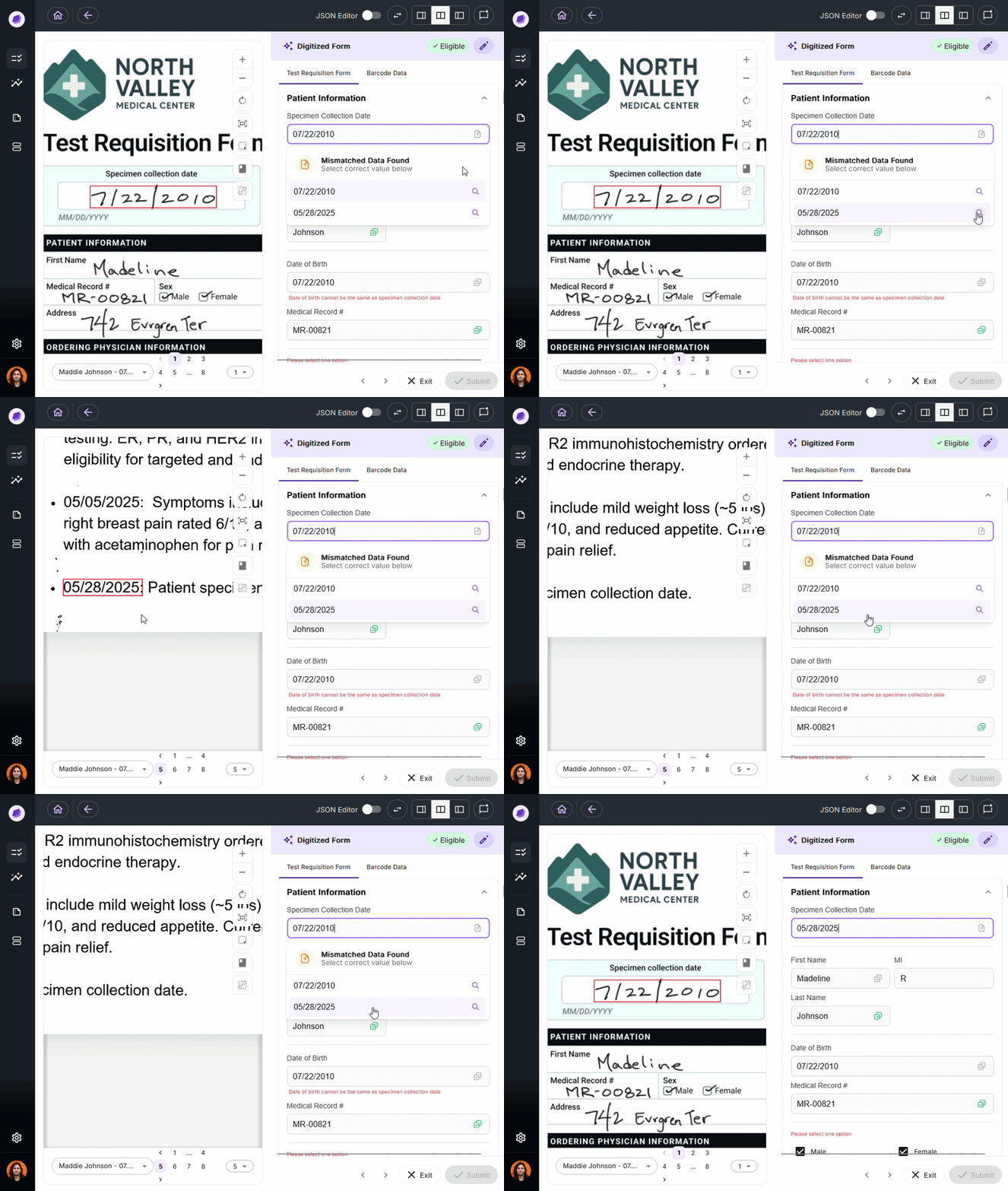
The single most important factor is how structured your documents are.
If you’re processing the same invoice template from the same five vendors, OCR with a simple parsing layer may be enough. But if you’re processing TRFs for dozens of different tests, each with slightly different layouts and varying handwriting quality across the clinics that have to fill them out, OCR will produce output that requires significant manual correction before it’s usable.
IDP is purpose-built for document complexity. Its use of convolutional neural networks, entity recognition, and configurable business rules means it adapts to variation rather than breaking under it.
Onymos DocKnow handles this at the lab level. It extracts data from TRFs, insurance cards, and supporting clinical documentation across various source formats, then reconciles the extracted values against connected systems before anything reaches billing.
→ See how DocKnow handles document complexity
Error Tolerance
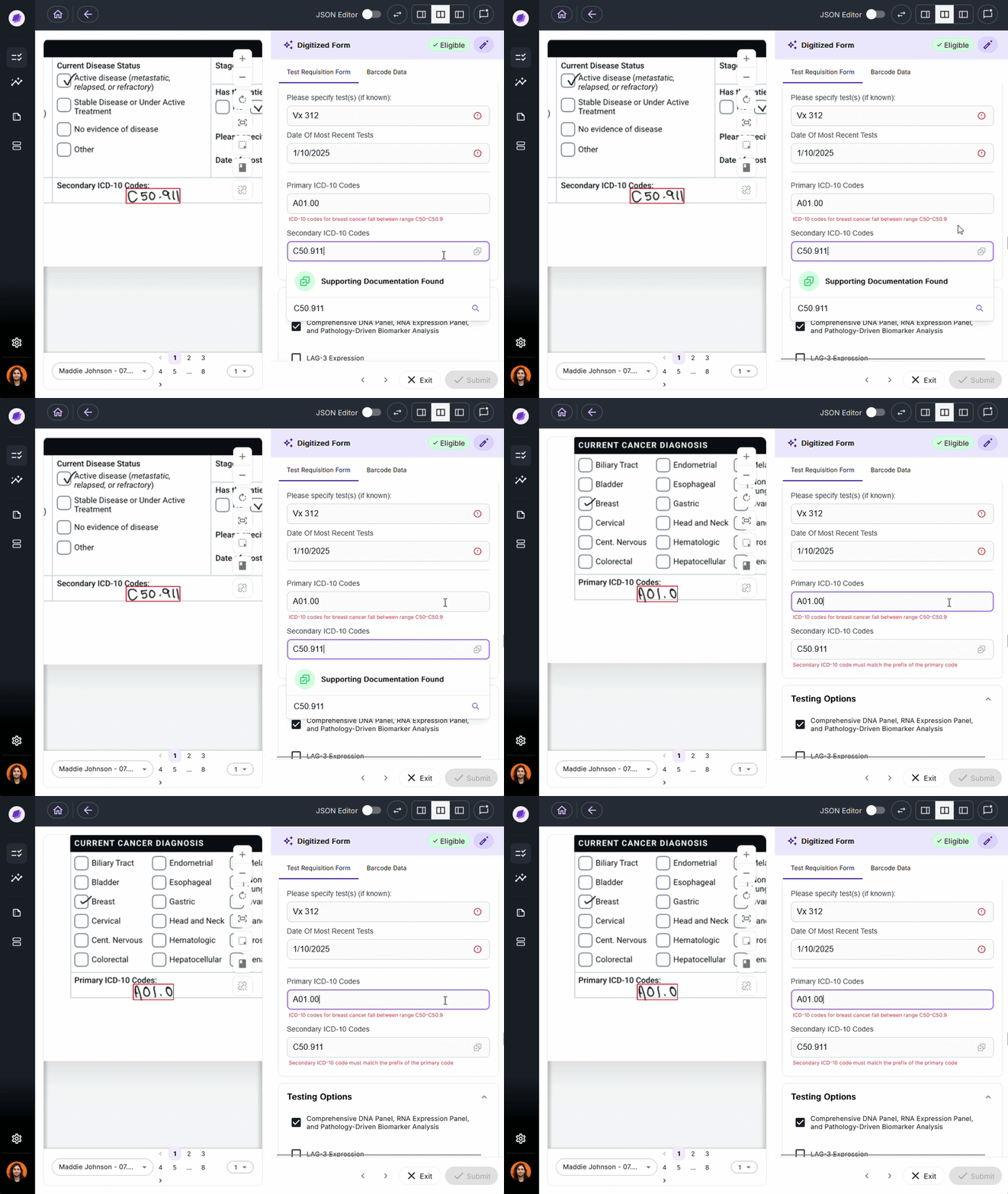
Every missed or incorrect data point is a cost.
In laboratory billing, a missing physician identifier will result in a denied claim, often worth hundreds or thousands of dollars.
Certain IDP solutions, like Onymos DocKnow, validate automatically, using AI reconciliation to cross-reference extracted data against connected records and flag discrepancies before they propagate downstream.
Compliance Obligations
For any organization subject to HIPAA, CLIA, CAP, or similar regulatory frameworks, your document processing platform has direct compliance implications. OCR tools are generally compliance-neutral.
They extract text but don’t maintain audit trails, chain-of-custody logs, or access controls at the document level.
IDP platforms built for healthcare document management include field-level audit trails, role-based access controls, and compliance logging by design. Onymos’s No-Data Architecture goes further, eliminating third-party data exposure entirely by ensuring patient records and extracted data never leave the customer’s own infrastructure.
→ Learn how Onymos’s No-Data Architecture keeps your data secure
The Intelligent Intake Platform: Onymos
Onymos DocKnow is the intelligent intake layer built specifically for clinical and diagnostic laboratories.
It acts as the operating layer between specimen intake and revenue, designed around the specific workflows labs run every day, and also provides enhanced OCR features.
Onymos Key Features
Here’s what makes Onymos stand out.
SmartSync: AI Data Reconciliation
SmartSync is Onymos’s proprietary AI reconciliation engine powered by Nucleus. After extracting data from TRFs, insurance cards, and supporting documentation, SmartSync cross-references those values against connected systems.
This is the mechanism that separates DocKnow from standard document processing. It defends the integrity of that data across every connected source.
Upfront Eligibility Checks
Most labs run eligibility checks after the test is complete, often because of staff shortages or workflow constraints. When a check fails at that point, the lab absorbs the cost.
DocKnow runs eligibility checks automatically at the point of intake, before any work is done on the specimen. Labs using Onymos report significant recovery of revenue that previously fell through post-test eligibility failures.
No-Data Architecture
Over 55% of healthcare data breaches originate from third-party vendors. Onymos eliminates this risk category. Its No-Data Architecture means Onymos never accesses, stores, or touches customer data. All records remain within the customer’s own environment, on-premises or in their own cloud.
Onymos is also SOC 2 Type II-certified and HIPAA-compliant.
Onymos Pricing
Onymos offers modular pricing. This means that labs can adopt lab intake automation first and expand to billing support and client services independently.
Onymos Customer Reviews
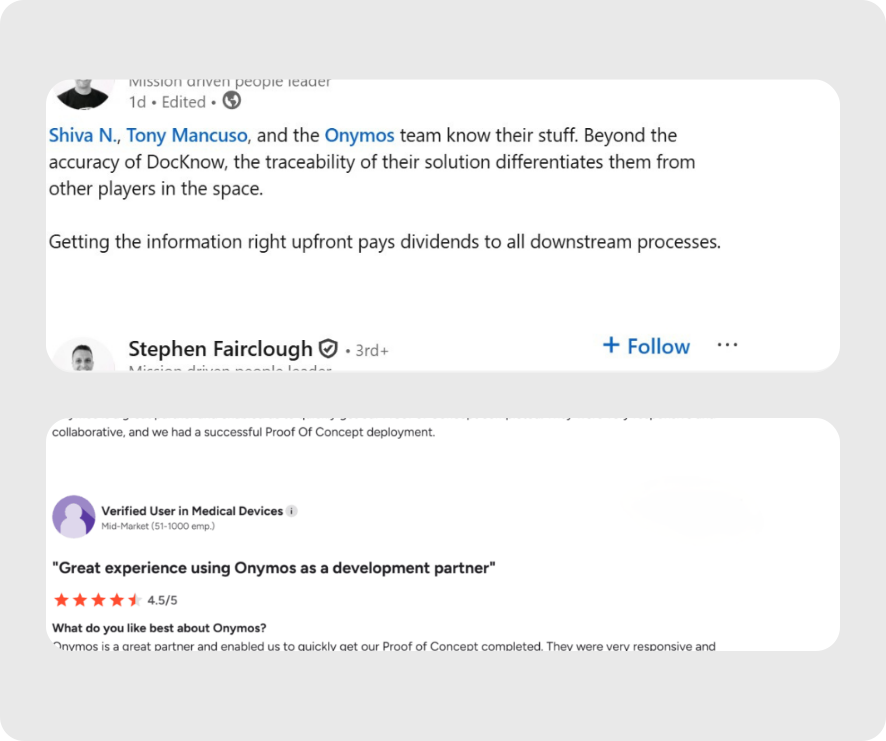
Stephen Fairclough, the former VP of Informatics at Personalis, praises the Onymos team’s knowledge, particularly highlighting traceability as a core function.
In a LinkedIn post, Hanson wrote: “Getting the information right upfront pays dividends to all downstream processes.”
Another verified user on G2 mentions, “We’ve used Onymos solutions and services for two major projects. It has been an incredibly positive experience in every aspect. Team members are extremely knowledgeable, reliable, articulate, and accommodating.”
Check out our customer success stories.
Who Onymos is Best For
- Labs losing revenue to denials: Where incomplete documentation or error-prone data entry at intake is the root cause of downstream RCM failures
- Lab directors evaluating growth: Organizations scaling test volume who can’t hire their way through the increase
- RCM and billing teams: Who need clean, structured data delivered into downstream systems automatically, with complete audit trails
What Will You Choose?
OCR is a solid tool for straightforward digitization, converting paper to machine-readable text, building searchable archives, or handling low-volume structured documents where accuracy can be manually verified.
If your documents are complex, your volume is high, and errors carry real financial or compliance weight, IDP is the correct category.
Are you running a diagnostic or clinical laboratory dependent on precision medicine? Onymos DocKnow is the IDP platform built specifically for your workflows.
Contact the team today to get started.
FAQs
Can OCR software handle handwritten forms?
Sometimes. Modern OCR tools with deep learning components can process handwritten forms, but accuracy drops significantly compared to printed text, especially on non-standard handwriting. IDP platforms handle handwritten input more reliably by combining OCR with contextual validation, flagging low-confidence extractions for review rather than silently passing incorrect data downstream.
Do I need IDP if I’m already using a document management system?
Possibly. Most document management systems handle storage, retrieval, and version control well but they don’t perform intelligent data extraction or validation. If your team is still manually entering data from documents into billing or operational systems, adding IDP upstream of your DMS dramatically reduces that manual workload. Onymos integrates with existing LIMS and billing systems rather than replacing them.
What’s the difference between IDP and Document AI?
Document AI is a term used by several cloud providers (Google, Microsoft) to describe their document processing APIs. These are typically general-purpose tools that extract text and fields from common document types. IDP platforms like Onymos DocKnow are purpose-built for specific industries and workflows, features that generic Document AI APIs don’t include out of the box.


Connect with our team to explore how Onymos solutions can maximize efficiency, minimize costs, and drive real, scalable growth.
Schedule your demoWe know healthcare data
AI in the lab. Workflow automation at scale. Digital front doors for hospitals and clinics. Healthcare and life sciences are changing fast. Are you ready? Subscribe to our blog for:
- Trends in healthcare tech
- Research and analysis
- Customer stories and more