3 Red Flags in Your Specimen Accessioning Process
A few weeks ago, our team was on-site at a diagnostic laboratory in California to audit their specimen accessioning process. Their technicians were using shared Excel spreadsheets to track incoming test orders.
One of our team members asked, “What if someone is typing on this row and they haven’t hit save yet, and someone else is using it?”
The lab manager replied, “Well, sometimes they do overwrite each other’s data.”
Yeah… a bit risky and not super efficient, to say the least.
Specimen accessioning sets the tone for every downstream step, like labeling, testing, analysis, reporting, and billing. When that front end breaks down, everything behind it becomes slower, riskier, or flat-out wrong.
Based on our first-hand experience auditing laboratories all over the world, here are three red flags to look out for that might indicate it’s time to reevaluate your approach to accessioning.
Red Flag #1: Using Spreadsheets for Sample Tracking
In one “Excel disaster” during the early days of the COVID-19 pandemic, “Public Health England, the agency responsible for aggregating and publishing COVID-19 data, imported a massive CSV file from a private lab—and exceeded Excel’s size limit. As a result, thousands of records at the end of the file failed to import. Nearly 16,000 cases therefore went unreported, and as many as 50,000 potentially infected people were never warned to self-isolate.”
But spreadsheets like Excel remain the path of least resistance for data entry tasks in the lab. They’re easy and familiar. They also almost guarantee data quality issues.
Manual transcription is already prone to clinically significant error rates. In a recent study of manually keyed point-of-care lab data pairs, 4% of the entries were discrepant.
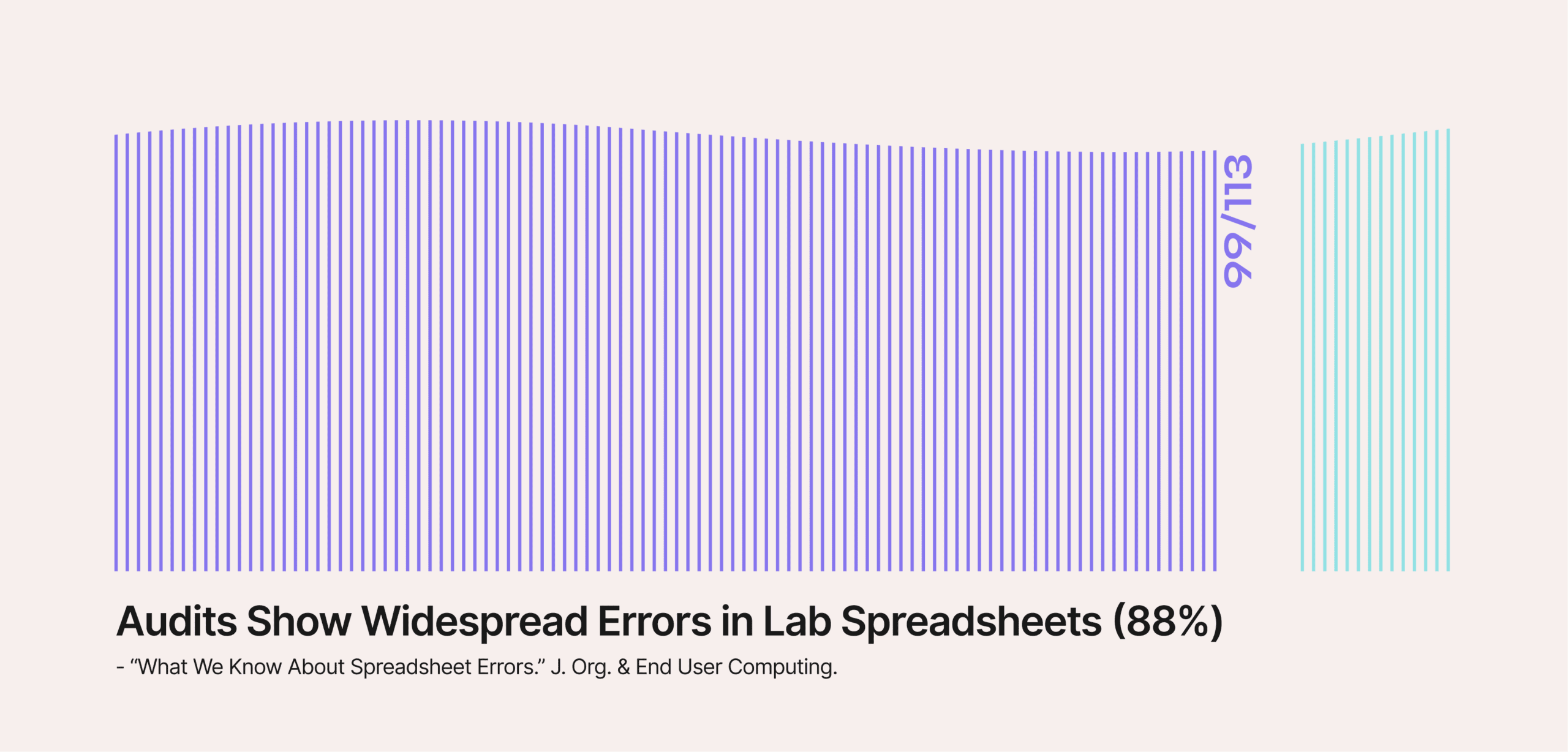
Spreadsheets make the problem (much) worse. In published audits, around 88–95% of complex spreadsheets contain errors. One lab-focused review reported setup errors in 88% of 113 audited spreadsheets.
Error rates like these aren’t surprising because multiple potential failure points exist.
- No built-in validation: Anyone can enter invalid data without immediate feedback
- Version control in theory, not practice: Multiple people working on different copies leads to confusion about which version is current (like in the example we experienced first-hand)
- Limited audit trails: Tracking who changed what and when is difficult or impossible, and is one of the major reasons regulators treat software like Excel as high-risk
- Security vulnerabilities: Spreadsheets often lack provisions for the security and integrity of data
The bottom line is that convenient doesn’t equal compliant (and as labs scale sample accessioning, spreadsheets often stop even being convenient, just entrenched).
Red Flag #2: Running Duplicate Systems
The ideal specimen accessioning workflow should include a single source of truth that makes every sample’s complete journey visible and traceable.
But sometimes, laboratories wind up running duplicate systems, like multiple LIMS or LIS. It can happen through growth, mergers, or departmental preferences.
Each individual system might work fine in isolation, but together they create friction points where data has to be transferred between them for end-to-end workflows to function.
Or, worse, the data can’t be transferred, so one system keeps the historical data.
That was the case when Astrix (a digital transformation partner for labs and clinics) was forced to run a legacy LIMS that was “expensive to maintain and rigid in nature” alongside a new LabWare LIMS for one of its clients. They simply could not cleanly “translate data from the legacy system.”
Running duplicate systems like this doesn’t just double (or triple) your infrastructure costs. It multiplies your operational risks.
- Workflow bottlenecks: Handoffs between systems create delays when metadata, accession numbers, and other information have to be aligned manually
- Transfers multiply errors: Every time staff re-key data from one system to another, it increases the likelihood of introducing transcription errors
- Data reconciliation is difficult: Reporting requires manual compilation from multiple sources, making it harder to find the data you need for tracking and compliance
Inevitably, running duplicate systems leads to slower TAT and more constraints on throughput.
Red Flag #3: Heavy Reliance on Double-Data Entry for Quality Control
This kind of workflow design can be an effective quality control measure. It can also be very expensive.
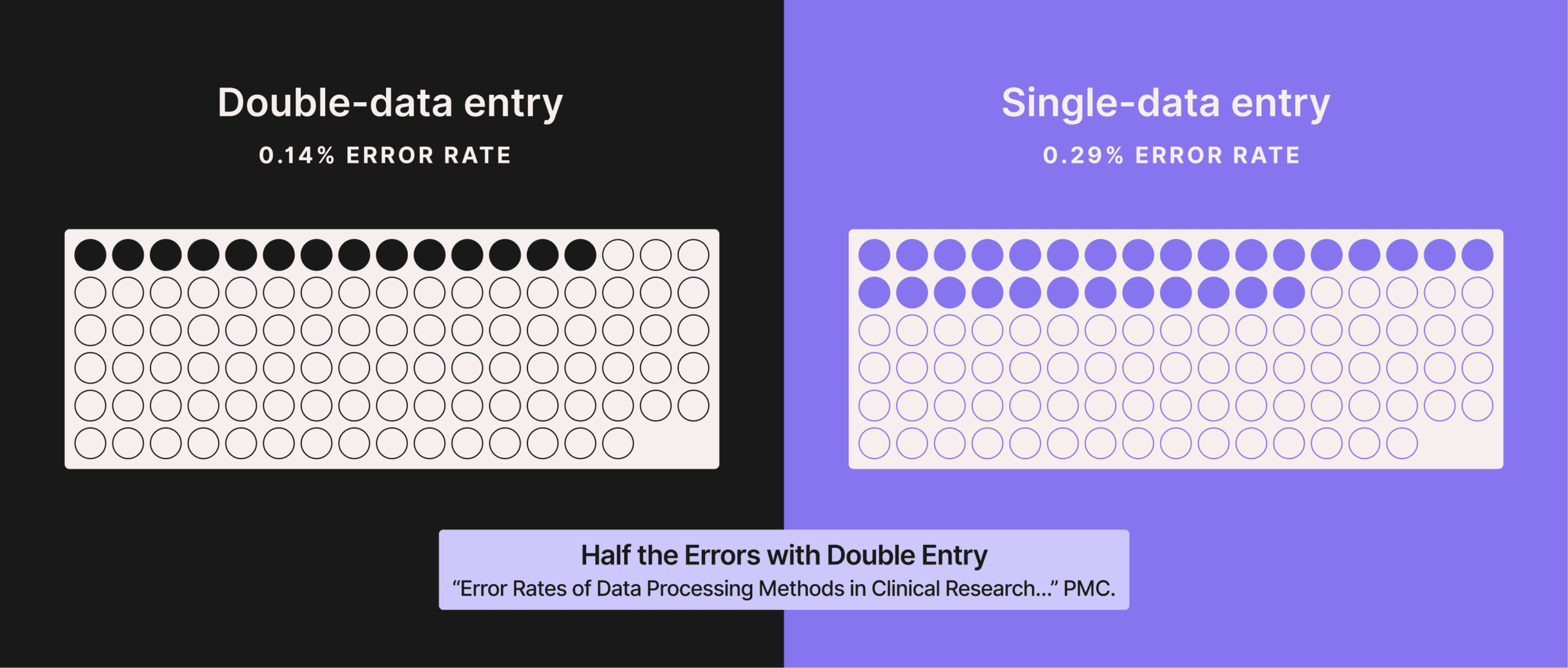
If it’s done right, double-data entry (also called two-pass verification) typically cuts data-entry error rates roughly in half compared with single entry, and performs far better than ‘enter-once-then-eyeball-check’ verification.
But the problem is that it’s not an effective way to scale QC. In many diagnostic labs, manually processing a test order form takes 7-10 minutes per accession.
Consider the math. When each accession has to be keyed in twice by two different team members, your staffing requirement doubles. There’s no way around it unless you’re willing to let total throughput drop.
Beyond the obvious labor expenses, this model generates other costs that many laboratories fail to account for.
- Staff burnout: Repetitive data entry and verification work is monotonous and leads to lower morale and higher turnover
- False sense of security: Depending on how rigorously double-data entry is implemented and monitored, it may simply become a rubber-stamp exercise that statistically performs no better than single-entry methods
In practice, double-data entry is often a bottleneck disguised as a safeguard.
How LabFlow Solves These Sample Accessioning Challenges
If these red flags feel familiar, you’re not alone.
As labs grow, manual intake quickly becomes unsustainable. Organizations like Guardant Health solved this by moving to a TRF-processing pipeline powered by Onymos LabFlow, part of our DocKnow platform.
LabFlow eliminates spreadsheet dependency by automatically extracting data from test requisitions, face sheets, and your other sensitive documents. Unlike spreadsheets, it provides built-in validation and comprehensive audit trails that meet CAP and CLIA regulatory requirements.
And rather than forcing you to replace an existing LIMS or LIS, LabFlow creates an intelligent intake layer that feeds clean, validated data into whatever downstream systems you’re using. DocKnow’s SmartSync engine can even compare extracted data against these connected systems, flagging discrepancies before they propagate. You get a single source of truth at the intake level, even if specimens flow through different systems downstream.
Finally, you won’t need double-data entry because LabFlow extracts and validates data simultaneously. The system checks for logical errors, compares data across multiple documents, and flags unclear fields for human review. It delivers superior accuracy without the linear scaling costs.
LabFlow integrates with your existing infrastructure, so you can start small, prove value quickly, and scale at your own pace.
Ready to eliminate these red flags from your accessioning process? Let’s talk about what intelligent automation can achieve in your lab.